On this page
- Our Evaluation Criteria for These Strategies
- Align Your Location to Canadian Census Metropolitan Areas
- Build a Three-Tier Headline Blending Canonical Titles and Core Skills
- Configure ‘Open to Work’ for Recruiters Only Behind the Privacy Wall
- Translate Experience into Canadian Dollar Scope and Quantifiable Impact
- Map Your Terminology to National Occupational Classification Standards
- Write an ‘About’ Summary That Functions as an Executive Pitch
- 1. The Value Hook (Lines 1-3)
- 2. Core Career Competencies (Prose or Short Callouts)
- 3. Key Career Highlights
- 4. Direct Call to Action and Work Authorization Status
- Anchor Your Top 5 Skills to Verified Hard Tools and Designations
- Secure Localized Social Proof Through Targeted Recommendations
- Avoiding Common LinkedIn Profile Traps That Repel Sourcers
- The Overqualification Trap
- Neglecting Profile Customization and URLs
- Broadcasting Every Internal Update to Your Network
- Inactive Messaging Settings
- Putting Your Optimized LinkedIn Profile into Motion
- In brief
- Key takeaways
- Frequently asked questions
Most Canadian job seekers fill their LinkedIn profile with duties from past jobs: a few snippets from an old resume, a standard corporate title, and then they wait for headhunters to get in touch. Weeks later, the inbox still has little beyond automated sales pitches and ghost notifications. It’s a frustrating return on even that modest effort.
Corporate talent acquisition teams and third-party staffing agencies across Toronto, Calgary, Montreal, and Vancouver actively search for candidates using specialized backend software called LinkedIn Recruiter. A recruiter filters and sorts profiles, runs Boolean operators, then scans candidate summaries in roughly six seconds before choosing to send an InMail or move on. A top-to-bottom reading of your career history rarely enters the picture.
Your profile needs to work as an indexed landing page that matches those searches. Picture the tired corporate sourcer with sixty open requisitions to fill before Friday. Write for that person’s search parameters and quick decisions; impressing your peers or chasing an algorithm in the abstract won’t help them find you.
According to the September 2026 Labour Force Survey released by Statistics Canada, the national unemployment rate held at 6.5% with approximately 21,105,000 workers employed across the country (Statistics Canada). Recruiters become far more selective when hiring tightens or stabilizes in specific sectors. Their filters narrow the pool by location, hard technical competencies, and verified scope. Miss their exact query filters and your profile won’t appear in their candidate pipeline, however suitable you might be for the work.
Our Evaluation Criteria for These Strategies
We tested and evaluated LinkedIn profile adjustments against four practical criteria to determine which updates generate recruiter inquiries in Canada:
- Search Algorithm Indexation: Does the update directly affect how LinkedIn Recruiter’s backend search engine parses, filters, and ranks profiles for specific job mandates?
- Regional Friction Elimination: Does it clear up confusion about location, commuting, and Canadian work authorization?
- Human Skimming Utility: Can a recruiter see commercial proof, project scope, and hard skills within the first two screen folds on a desktop browser or mobile screen?
- Employment Discretion: Can an employed professional signal availability to external recruiters without alerting internal management or human resources teams?
Align Your Location to Canadian Census Metropolitan Areas
Choose the metropolitan area recruiters search for when you set your LinkedIn location. A municipality that’s too specific can cost you a place in their results.
If you live in Mississauga, Brampton, Markham, or Oakville, using your municipality can hide your profile from corporate recruiters in downtown Toronto. An in-house recruiter at a bank or tech firm in Toronto typically starts in LinkedIn Recruiter by entering “Greater Toronto Area” or “Toronto, Ontario, Canada” in the Location filter, with a strict 25-kilometer radius. List yourself exclusively in “Oakville, Ontario” and certain search strings will exclude you from the primary candidate pool.
Across Western Canada, the advice is the same. For Airdrie or Cochrane, use “Calgary, Alberta, Canada” or the Calgary Metropolitan Region. For Burnaby, Richmond, or Surrey, choose “Greater Vancouver Metropolitan Area”.
Talent sourcers rarely run twenty separate municipal searches to fill a single opening. They search by Census Metropolitan Area (CMA) designations because company hybrid policies require staff to commute to central office hubs two or three days each week. The software’s geographic filters can be unforgiving, even when your location seems perfectly reasonable to you.
Planning an interprovincial move? Change your LinkedIn location to your destination city before contacting employers. Canadian recruiters rarely search outside their province unless a role is strictly 100% remote or calls for highly scarce executive skill sets. If you’re in Halifax and moving to Calgary in two months, keep Calgary as your profile location. You can clarify your exact move-in date immediately when a recruiter messages you.
Federal labour policy actively supports interprovincial worker mobility, as the Government of Canada outlines:
Moving within Canada to work: Learn about labour mobility between provinces and territories.
Government support for geographic mobility doesn’t change recruiters’ preference for local candidates who can start on Monday, without relocation stipends or cross-country moving delays. I’d fix the location field first. The rest of your profile optimization can’t help you in a search that excludes you through postal code logic.
Build a Three-Tier Headline Blending Canonical Titles and Core Skills
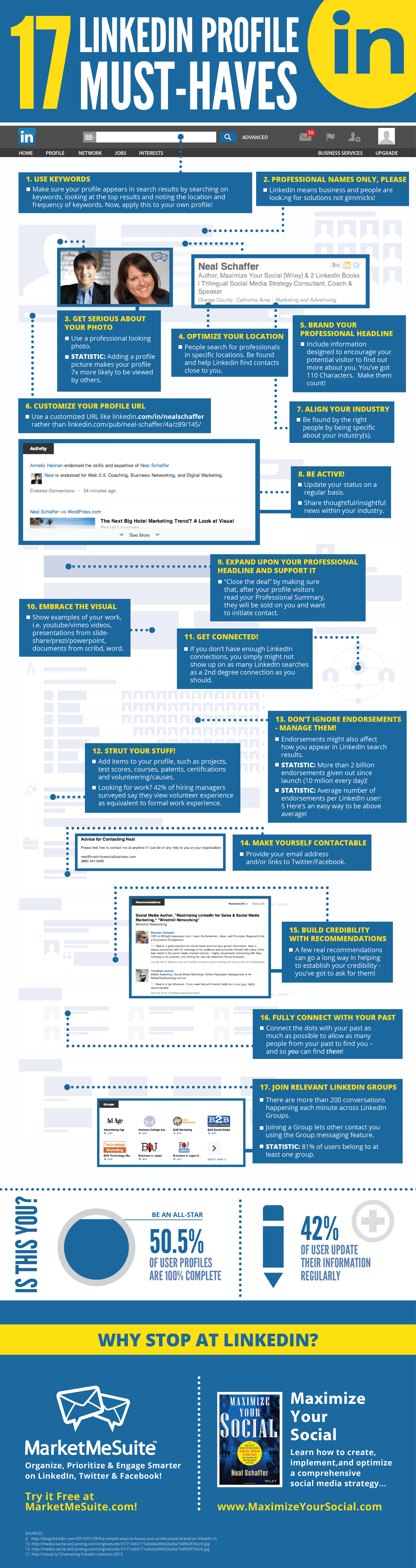
Your headline deserves more attention than any other part of your LinkedIn profile. It has more weight in algorithmic searches than your summary or job descriptions, and candidates see only this text beside your photo in search results.
You have a 220-character limit. Most people spend it on filler such as “Passionate Change Agent Helping Brands Tell Authentic Stories” or “Aspiring Professional Looking for New Opportunities.” That’s a lot of space spent saying very little.
Recruiters search for standard job titles and technical tools. “passionate change agents” won’t be on their search list.
For a Canadian LinkedIn headline that attracts recruiters, stick to this three-tier formula:
[Canonical Target Job Title] | [2-3 High-Demand Core Skills or Methodologies] | [Designation, Quantifiable Industry Impact, or Specialization]
For an experienced project manager in infrastructure or commercial real estate, these two versions show how much the wording matters:
-
Bad Headline: “Accomplished Leader Passionate about building great teams and driving operational excellence Open to opportunities” -
Optimized Headline: “Senior Project Manager PMP Capital Projects, EPC & Agile Delivery Delivering $10M+ Commercial Builds”
The optimized headline matches four direct recruiter search filters: “Senior Project Manager”, “PMP”, “EPC”, and “Capital Projects”. A recruiter searching for “PMP Project Manager” will find this profile near the top of the results. Each of those terms gives the search something specific to match.
In data or software engineering, give languages and cloud infrastructure priority over soft skills:
- Bad Headline: “Data Specialist looking to solve business problems with machine learning”
-
Optimized Headline: “Senior Data Analyst SQL, Python, Tableau, AWS Business Intelligence & Predictive Analytics”
Leave creative startup titles out of your headline. If a boutique firm called you a “Growth Ninja” or “Customer Happiness Wizard”, use “Growth Marketing Manager” or “Customer Support Team Lead”. Recruiters search using standardized taxonomies, so your headline needs the titles those searches recognize.
Configure ‘Open to Work’ for Recruiters Only Behind the Privacy Wall
If you’re employed, the backend “Recruiters Only” toggle in the Open to Work dashboard is the better choice. Canadian job seekers have debated the green “#OpenToWork” photo frame for years, and in our work with corporate and agency recruiters, we’ve seen mixed reactions to it.
The public frame rarely hurts contract workers, freelance developers, and early-career applicants. For senior professionals, managers, and people who are currently employed, though, it can suggest distress or draw attention from current colleagues you’d prefer to avoid.
With the setting configured properly, LinkedIn puts your account in the “Open to Work” spotlight tab inside LinkedIn Recruiter. That’s a useful place to appear: a recruiter with 400 candidate profiles in their search results will frequently use the “Open to Work” filter to narrow the list to the 60 people most likely to answer an InMail. Leaving that backend flag off pushes you to the bottom of their outreach queue.
To set it up safely:
- Under your profile header, click “Open to” and choose “Finding a new job.”
- Add five specific job titles you’re targeting, all within the same functional family. Avoid choosing ten unrelated titles.
- Choose your preferred workplace types (On-site, Hybrid, Remote), then name your target Canadian cities in your location preferences.
- For your start date, choose “Immediately” or “Casually looking.”
- In the visibility settings, choose “Recruiters only” instead of “All LinkedIn members.”
LinkedIn’s proprietary privacy logic hides this setting from people whose LinkedIn Recruiter license is associated with your current employer’s corporate domain.
The protection isn’t 100% foolproof. An external sourcer could theoretically see your status if your company uses a third-party subsidiary or an external headhunting firm with a Recruiter license that isn’t linked directly to your employer’s company page. That’s the privacy caveat worth understanding before you switch it on. In practice, the setting keeps your status hidden from your internal HR department while letting external headhunters find you instantly.
Translate Experience into Canadian Dollar Scope and Quantifiable Impact
Your Experience section needs to show the scale of the work you’ve handled. Too many job seekers in Canada write generic duty checklists, a recurring problem among newcomers and domestic professionals moving between industries.
Recruiters use that detail to judge whether you can handle the role they’re filling. A list of responsibilities lifted from an HR policy handbook gives them little to work with.
Take “Managed budgets, supervised team members, and conducted financial reconciliations,” for example. That leaves a recruiter asking: was it a $15,000 office expense budget or a $40,000,000 operating expenditure portfolio? Were you supervising two student interns or thirty unionized tradespeople? Those are very different jobs.
Give every bullet in your LinkedIn Experience section this shape:
Action Verb + Scope / Context + Quantifiable Business Result
For a corporate accountant, the difference looks like this:
- Weak Duty Statement: “Responsible for monthly financial reporting, variance analysis, and preparing audit schedules for executive management.”
- Quantified Canadian Impact: “Led month-end financial closes across four Canadian operating entities, reducing reporting lag from 10 days to 4 days while managing $18M CAD in operational balance sheets.”
If you’ve recently immigrated to Canada, take extra care to explain your international experience. Canadian recruiters have a habit of discounting work when they don’t recognize the company or understand its local scale. It’s frustrating, but familiar benchmarks help them make sense of it.
For a major bank or telecoms operator in South America, Europe, or Asia, put a single sentence directly under your title to establish that context:
“XYZ Corp (National telecommunications provider with 12M subscribers and $1.2B annual revenue)”
Follow that framing with figures converted from local currencies into Canadian Dollars (CAD) or US Dollars (USD). An average hiring manager in Calgary or Toronto will gloss over savings of 50 million Indian Rupees or 200 million Nigerian Naira because they can’t mentally calculate the commercial weight. Use the Canadian dollar equivalent at the time of the project. When sourcers compare profiles, that clear financial scope shows you’ve worked at the level their mandate requires.
Map Your Terminology to National Occupational Classification Standards
Use the occupational language Canadian employers use in their job descriptions. Talent acquisition teams, particularly in large corporate, public sector, and healthcare environments, follow federal labour market taxonomies. The federal government groups all occupations under the National Occupational Classification (NOC) system, using Training, Education, Experience and Responsibilities (TEER) brackets to categorize roles.
Leave your four- or five-digit NOC code out of your profile headline. It reads like immigration paperwork and can make a recruiter wonder whether you’ve thought about your commercial value. What belongs in your profile is the exact terminology used in official Canadian occupational standards, along with the standard tools and core duties they describe.
Job Bank Canada gathers these industry definitions and explains how occupations are tracked and forecasted across provinces:
Employment outlooks, also known as job prospects, refer to the probability of future growth for an occupation. Occupations with good outlooks are easier for job seekers to find, offer a high potential for professional development and will still be in demand several years from now.
Source: Job Bank, Labour Market Information - Explore the Market
This overview video shows how the federal government organizes career tools and provincial labour market data:
Before writing each position in your Experience section, look up your Canadian job profile on Job Bank. Use its standardized phrasing for core duties to guide your wording.
In human resources, for example, Canadian employers search for “pay equity compliance”, “Employment Standards Act (ESA)”, “WSIB administration”, and “CPHR pathway”. A profile that uses only generic American terms such as “FLSA compliance” or “401k administration” will be missed entirely by an Ontario recruiter’s automated search string. The wording matters here.
Engineers and trades need the same attention to Canadian terminology. If you’re eligible for or already hold your Professional Engineer (P.Eng.) licence with EGBC, APEGA, or PEO, say so clearly in your headline and summary. If you have an engineering degree from an international university and are undergoing credential assessment with a provincial regulator, write: “EIT Registered” or “Engineering Intern / Academic Qualifications Assessed by APEGA.” Using these local terms helps the recruiter see how your skills translate directly to the provincial regulatory framework.
Write an ‘About’ Summary That Functions as an Executive Pitch
Most LinkedIn profiles lose their way in the “About” section. You’ll find either an empty space or three dry paragraphs in a stiff third-person voice: “John Smith is a seasoned marketing professional who has spent fifteen years…”
Everyone knows you wrote your own LinkedIn summary. Referring to yourself in the third person makes it feel detached and painfully corporate. Use the first person (“I”) and write it as an executive elevator pitch.
Give the first three lines particular attention. LinkedIn cuts off the text behind a “…see more” link on desktop and mobile feeds, so those lines have to earn the click. Spend them on corporate pleasantries and nobody will open the rest.
Build your summary around four blocks:
1. The Value Hook (Lines 1-3)
Tell the reader who you are, which problems you solve and how large an operation you work with. Be specific enough that a recruiter can picture your scope.
Example: “I help enterprise logistics and supply chain companies eliminate operational bottlenecks across Canadian distribution corridors. Over the last nine years, I have directed multimodal freight programs and enterprise warehouse implementations across Ontario and Quebec.”
2. Core Career Competencies (Prose or Short Callouts)
Describe the functional areas you know deeply at a technical level. Leave out generic descriptions such as “hard worker” or “strategic thinker.” Give recruiters concrete operations to work with: enterprise resource planning (ERP) systems, regulatory compliance, budgeting thresholds, or contract negotiations.
3. Key Career Highlights
Choose three to four of your strongest career wins and put numbers to them. Name the systems you used (SAP, Salesforce, Workday, Python, AWS), then show the measurable result: costs reduced, revenue generated, time saved.
4. Direct Call to Action and Work Authorization Status
Close by welcoming professional outreach. Where relevant, add a clear statement of your status in Canada.
For a Canadian Citizen or Permanent Resident, a line such as “Legally authorized to work in Canada for any employer (No sponsorship required)” can remove a substantial hidden hurdle. Complex temporary worker regulations and the low-wage LMIA freeze leave many Canadian corporate recruiters hesitant to contact candidates whose profiles look international. They’re wary of red tape. Answering that concern in your summary helps keep them reading.
If you’re weighing document styles or comparing this with a paper application, our guide on one-page vs two-page resume in Canada explains how digital summaries complement formal resumes.
Anchor Your Top 5 Skills to Verified Hard Tools and Designations
Your Skills section now helps determine whether a recruiter sees your profile in LinkedIn Recruiter. It used to be something of a vanity contest, with former coworkers endorsing you for “Teamwork” and “Microsoft Word.”
When a recruiter opens a job requisition in LinkedIn Recruiter, the platform asks them to attach up to ten mandatory skills to the search pipeline. The software then ranks applicants and candidates in search results with badges such as “5 of 10 skills match” or “8 of 10 skills match.” Match only two of those skills, and the interface hides your profile under an “Unlikely match” accordion folder. That’s a good reason to give this section some attention.
To improve your visibility:
- Fill all 50 allowable skill slots on your profile. Stopping at ten leaves room unused.
- Put high-value, searchable technical capabilities in your top five displayed skills. Soft personal traits shouldn’t take those spots.
- Swap placeholder skills such as “Public Speaking”, “Problem Solving”, or “Management” for exact, industry-standard nouns: “Financial Modeling”, “Corporate Tax”, “Kubernetes”, “Regulatory Compliance”, “Cross-Functional Leadership”, or “Contract Negotiation”.
- Use LinkedIn’s skill-mapping feature to connect each skill to the specific company where you used it in your Experience section.
Provincial employment programs consistently stress matching technical capabilities to the demands of specific sectors. Employment Ontario makes this point in its workforce resources:
We connect people looking for work with employers looking for workers, and have locations across the province to help with job search and employment and training opportunities.
Source: Employment Ontario, Employment Services and Supports
Connecting your listed skills to Canadian or international employment records lets both the recruiter’s algorithm and the person reviewing your profile confirm where you gained that competence. If your resume needs structural work before you bring it into line with your profile, a professional resume assessment can help you audit your technical strengths.
Secure Localized Social Proof Through Targeted Recommendations
A recommendation gives recruiters third-party validation and a reason to stop scrolling past your file. They spend their days assessing claims they can’t verify: anyone writing their own profile can say they managed an enterprise implementation or revitalized a sales team.
Aim for three to five substantive recommendations from managers, senior clients, or executive stakeholders who can speak to your work ethic and commercial delivery. Thirty generic recommendations from university peers won’t do much for you here.
Give the person you’re asking some direction. Clicking “Request a recommendation” and sending LinkedIn’s default boilerplate message leaves them to work out what to say. Send a personal note by email or LinkedIn messaging with a specific focus:
“Hi David, I am updating my LinkedIn profile to reflect my recent work in supply chain optimization. Would you be open to writing a short, 3-4 sentence recommendation focusing specifically on how our team executed the warehouse transition project in Calgary last winter? If it helps, I would be glad to draft a few bullet points you can edit as you see fit.”
Canadian managers or colleagues at recognizable domestic firms carry particular psychological weight with local hiring teams. Their recommendations demonstrate that you understand Canadian workplace norms, team dynamics, and standards for cross-functional communication.
If you’re a newcomer to Canada without domestic managers to ask yet, approach leaders from multinational organizations, global clients, or respected colleagues from your previous markets. Ask them to focus on specific results, your accountability, and the scale of your projects. Those details matter most.
Avoiding Common LinkedIn Profile Traps That Repel Sourcers
Adding keywords only gets you so far if old profile habits keep recruiters away. Over the years, we have seen qualified professionals lose candidate opportunities through profile mistakes they could have avoided.
The Overqualification Trap
When you’re an experienced leader pursuing mid-level specialist roles, a profile heavy on executive language can make recruiters hesitate. They may expect salary demands beyond their budget or worry you’ll leave quickly. Keep your senior expertise visible while making your interest in targeted operational roles clear. Our breakdown on how to address overqualification on a resume explains how to get that tone right.
Neglecting Profile Customization and URLs
An auto-generated LinkedIn public URL full of random numbers and hyphens (e.g., linkedin.com/in/jane-doe-987b412a/) gives the impression that you’ve neglected the digital details. Customizing your public profile handle to a clean linkedin.com/in/janedoe takes thirty seconds. It’s a small housekeeping job worth doing. Then put the clean URL in your resume header and professional email signature.
Broadcasting Every Internal Update to Your Network
Before overhauling your profile while you’re employed, go to Settings & Privacy > Visibility > Share profile updates with your network and turn it OFF. Do this before you start the mass edits. Your current manager and teammates don’t need fifteen notifications in a single afternoon announcing that you’ve rewritten your headline, revised six past job descriptions, and added twenty new technical skills. After you’ve finished and polished the updates, you can switch notifications back on to share major milestones if you choose.
Inactive Messaging Settings
In your LinkedIn communication settings, check that InMail notifications go to an active personal email address you check daily. Agency recruiters in competitive tech, finance, and engineering hiring cycles often contact multiple candidates at once. When the message concerns a priority direct-hire mandate, a four days wait for your reply likely means another applicant has already filled the spot. Agency workflows and internal corporate hiring teams operate differently, so understanding the distinction helps you judge response timelines. Our analysis on staffing agency vs direct hire explains those differences.
Putting Your Optimized LinkedIn Profile into Motion
Once you’ve targeted your headline, set your Census Metropolitan Area, and given your skills the right weight, put that profile to work by taking part in Canadian business conversations. The profile is your foundation; what you do with it matters too.
Follow the Canadian corporate pages of companies you’d like to join. Find active Canadian professional groups in your discipline, and connect with agency recruiters who work strictly in your niche. When you message a recruiter directly, keep it brief and professional, with a clear outcome in mind. Give them enough context to see why you’re reaching out:
“Hello Sarah, I noticed you recruit for enterprise finance roles across the Greater Toronto Area. I recently updated my profile to highlight my recent work leading IFRS reporting and ERP implementations at commercial scale. If you are handling mandates for Senior Corporate Controllers in the region, I would welcome connecting.”
Think of your LinkedIn profile as a high-intent commercial landing page. Build your experience around hard metrics. Set your regional parameters to match how recruiters work, and remove location friction. Those choices make it easier for Canadian talent acquisition professionals to do what they’re there to do: contact you and book an initial screening call.
Key takeaways
6
- LinkedIn location settings should match the metropolitan areas Canadian recruiters search, including the destination city when an interprovincial move is planned.
- LinkedIn headlines should combine a standard target job title with core technical skills and a designation, measurable impact or specialization.
- The Recruiters Only setting signals availability to external recruiters, although LinkedIn cannot guarantee complete privacy from a current employer.
- LinkedIn Experience entries should explain project scope and measurable results, with international financial figures translated into familiar Canadian or US dollar amounts.
- Canadian occupational terminology from Job Bank can guide profile wording, while NOC codes should stay out of LinkedIn headlines.
- The LinkedIn Skills section should prioritize searchable technical capabilities and connect listed skills to the employment records where candidates used them.
Frequently asked questions
6
What location should Canadian job seekers use on LinkedIn?
Canadian job seekers should use the metropolitan area recruiters search for, such as Calgary or the Greater Toronto Area. A narrowly specified municipality can exclude a profile from searches centred on a nearby office hub. Candidates planning an interprovincial move should set their destination city before contacting employers and clarify their moving date when a recruiter responds.
How should a LinkedIn headline be written for Canadian recruiters?
A LinkedIn headline should combine a standard target job title, searchable core skills and a designation, measurable industry impact or specialization. Recruiters search for recognized titles and technical tools, so creative internal titles can weaken search matching. Data and software professionals should give programming languages and cloud infrastructure priority over generic soft skills.
Can employers see the Recruiters Only Open to Work setting?
LinkedIn attempts to hide the Recruiters Only setting from recruiters associated with a candidate's current employer, but complete privacy is not guaranteed. An external headhunting firm or third-party subsidiary with a separate Recruiter licence could potentially see the status. The setting also places a candidate in LinkedIn Recruiter's Open to Work spotlight, helping external recruiters identify available candidates.
How should international experience be described on LinkedIn for Canadian recruiters?
International experience should include employer context, project scope and measurable results expressed in familiar financial terms. A short description of an unfamiliar employer can establish the organization's scale through subscriber counts or annual revenue. Financial figures can be converted into CAD or USD, with Canadian dollar equivalents based on the time of the project.
What should a LinkedIn About section include for Canadian recruiters?
A LinkedIn About section should explain the candidate's value, technical competencies and measurable career highlights, then welcome professional outreach. The opening lines should establish the problems the candidate solves and the scale of the work. A relevant statement of Canadian work authorization can reduce recruiter uncertainty about sponsorship when a profile includes international experience.
How can LinkedIn skills improve visibility to Canadian recruiters?
LinkedIn skills can improve visibility by matching the technical requirements recruiters attach to their searches. Candidates should fill the available skill slots and place high-value technical capabilities among the most prominent skills. LinkedIn's skill-mapping feature can connect each capability to a specific employer, helping recruiters confirm where the candidate gained the experience.
Upcoming career fairs
Career fairs in Toronto
Halton Career Fair and Training Expo Canada - October 21, 2026
- Nearby · Oakville
- In person
- Free
Toronto Newcomer Fair
- In person
- Free
Listings are gathered each month from public event pages. Confirm the details with the organizer before you go.
More From the Blog
Ubisoft Studio Cuts: Outlook for Video Game Jobs in Canada
Examine how Ubisoft studio cuts impact video game jobs in Canada, from Montreal to Toronto, plus how to adapt portfolios and transition...
Read the articleLow-Wage LMIA Freeze: What It Means for Canadian Job Seekers
Canada expanded its low-wage LMIA freeze to 30 metropolitan areas. Discover what this hiring shift means for Canadian job seekers and...
Read the articleHow to Get an Accounting Job in Canada: A Step-by-Step Tutorial
Learn how to land an accounting job in Canada with this step-by-step guide covering provincial CPA pathways, ASPE, resumes, and technical...
Read the articleReady to Launch Your Career Marketing Campaign?
Book a strategy call and see how Nainly can transform your job search.
Schedule a CallFree consultation. No commitment.